Social Icons

Pages

Tuesday, 28 April 2015

Microsoft Office 365 Deployment – 5 Exclusive Benefits for New Customers

Today, the market is filled with plenty of advanced computer applications and services and without a doubt, Office 365 is the best among the business productivity tools. This application and functionality not only offers freedom to access and work on important files rather assists the users to create comparison among the files. Throughout the world, thousands of enterprises are experiencing the improved benefits of Office 365 and we are here to explain the most important advantages for the potential customers, who are ready to deploy the Office 365 in their business to lead the crowd.
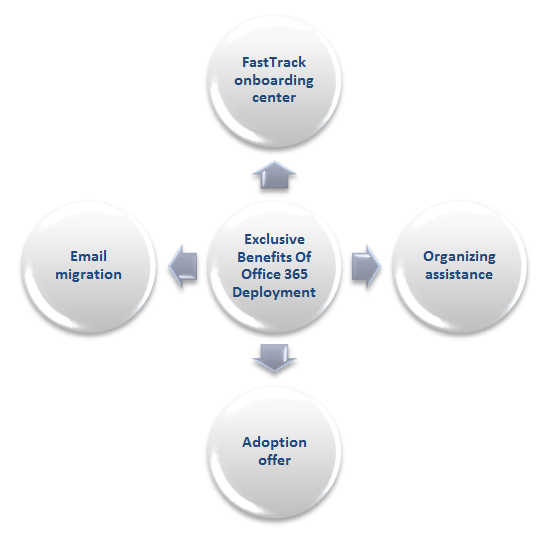

  1. FastTrack onboarding center: To encourage and help the new customers, Microsoft is ready to offer support them by configuring Office 365 package, including SharePoint, Exchange, Lync, Yammer and Office 365 Pro Plus. Since the experts come from the Microsoft office, the Office 365 installation and deployment is faster. This promotional offer can be availed only if you buy a minimum of 150 licenses.
  2. Organizing assistance: Besides helping the fresh customers to prepare their infrastructure and to integrate the provisioning services and identity management, it offers amazing user experience with trial sessions and easy step-by-step documentation process, so that the users are accustomed to the new Office 365 scenario.
  3. Adoption offer: Microsoft offers Adoption offer to the customers who buy Office 365 license between 2014 September to 2015 June. This offer helps to reimburse a legitimate partner, chosen by the customer, to conduct the adoption activities of Office 365. This offer is valid for the customers, who buy at least 150 SKUs, within the given time.
  4. Email migration:Email Migration is a part of Adoption offer, mentioned before. Either Microsoft or a legitimate partner of Microsoft performs email migration. They can remotely migrate the new mailboxes from Gmail, Exchange server, IBM Domino and other IMAP environment.
  5. Additional benefits:To make Office 365 succeed in the customer’s environment, Microsoft supplies plenty of utilities and resources, which include readymade templates and proven methods specified by plenty of companies and experts, who adapt to Office 365 in the successful way. The users can also contact the dedicated communities to get their queries cleared.

Monday, 20 April 2015

Everything You Need to Know About Office 365 Technical Support

With customer satisfaction becoming one of the most critical aspects of modern business, providing quality customer support has become essential for all types of businesses. The need of good customer support becomes all the more important for IT solutions and services because regardless of how good your services or solutions are, customers are bound to face minor/major problems  with them and you need to ensure quick addressing of such issues to maintain high levels of customer satisfaction. This the reason Microsoft offers many types of technical support services for its business productivity advancing suite, Office 365.


There are 4 major ways in which Microsoft offers technical assistance for Office 365:
  1. Online help: Microsoft has an exclusive website, Support.office.com for Office 365 Online help that has answers to most of the common issues of the users like setup or installation issues with Office 365, training sessions, how to check the Office 365 bill details, and much more. This website is accessible to all and anyone can easily find the solution to such minor issues by following the instructions on this website.
  2. Help from Community Forums: Microsoft has active community forums where users can discuss their hassles and get them resolved by the Microsoft experts active in the forums. Such community forums are a quick of finding solutions as there is a high probability that the issues being faced by the user have already been discussed in the community forum, and in case the user cannot find relevant answers, he/she can always post a new question.
  3. Online Help request: For faster resolution of problems, Microsoft allows the admins to submit online requests for help, which the Office 365 admin center addresses at priority. The Office 365 admin center either finds a solution to the problem or connects the Admin to an expert via email or phone. It is worth noting that this facility is not available to everyone; instead only Admins can submit help requests to the Office 365 admin center.
  4. 24 X 7 Technical Support Helpdesk: Last but not the least, Microsoft also offers telephone-based customer support services. This facility is also exclusive only to the Admins and they need to provide their account details when speaking to the technical support executive. The dialing number of the Office 365 technical support helpdesk can vary from country to country. It is worth noting that 24 X 7 telephone-based Office 365 tech support service for admins is provided only in English.
The above discussed Office 365 tech support services are the ones provided to Office 365 users directly from the users. In case you have purchased Office 365 services from a Microsoft VAR (Value Added Reseller), it may provide its own Office 365 technical support services as well.

Thursday, 2 April 2015

Office 365 Data Migration: Orchestrated for Seamless Migration!

Office 365 provides business organizations with a cloud based service which helps their workforce in better collaboration, management and security. The migration to Office 365 must be done in a way that it has minimum impact on the end users and comes with minimum risks involved. While user productivity during the transition has to be maintained, it is imperative to plan the migration for a fast and seamless transition to the cloud.

Planning the migration also involves understanding how the new environment will be managed in an automated and centralized way --- with automated administrative tasks and improved reporting and auditing resources in a secure environment.

Office 365 is Flexible

Whether you are migrating from on-premises or any other cloud-based technology, moving to Office 365 cloud brings in significant features and benefits:

Office 365 is Flexible

                                        
You can easily migrate the contents of your on-premise mailboxes and public folders to the cloud. All items including public folders are migrated from Exchange Server to Exchange Online without any adverse impact on users.

Switching from Google Apps for Business to Office 365 allows you to migrate your users to the cloud. Google mail, calendars, notes, tasks or journals and contacts of all users from your enterprise can be migrated to Microsoft Online services quite simply.

Scheduled Migration of Data to Office 365

Administrators migrate mailboxes of users either during weekends or overnight. The migration can be scheduled and mailboxes can also be migrated on priority basis by setting up a migration order. This can be used to push more significant data first.

What's more! Users can use their mailboxes while the data is copied to Office 365 and the email too is rendered unaffected. So, users can have access to their old mailboxes even during migration of their mail items to Office 365. 

Migrate applications and infrastructure to the cloud

Migrate applications and infrastructure to the cloud
                                                                 

Secure migration of Data to Office 365

As far as safety of user data is concerned, it is absolutely secure and you can even vouch for detailed status reports for each migrated item. Also, it does not cost you much time or lead to productivity hitches. The entire transition is seamless and affordable from source to destination servers with your users experiencing zero downtime during the entire event!

From Mailbox migration and configuration to software on boarding and deployment, you experience fast and scalable migration across platforms. Public folders, documents, archives --- all can be migrated simply even keeping file hierarchies in order. Email clients can be configured from a single point of control.

Enhanced Data Security on the Cloud

Your emails are kept encrypted until opened by the recipient. Office 365 data are highly protected from any unauthorized access. Such seamless staged migration can be managed from on-premise, hosted Exchange or Google Apps.

You just need to access the e-mail environment and start migration regardless of the source protocol, manage and configure users, eliminate too much of planning and upgrade work and enjoy secure and organized data migration. Enjoy easy deployment and management with virtually no productivity loss for end users and benefit from reduced project costs --- ensure a high-quality migration experience!

Wednesday, 25 March 2015

Office 365 Hybrid Deployment: Enjoy the Best of Both Worlds!

With a Hybrid environment, you get the option of continuing to use Exchange mail like an on-premise user and remote workers will be able to access Office 365 web interface. However, with a hybrid deployment, the domains will remain the same for both instances!

IT professionals may want to configure a hybrid environment in order to understand and make sure how Office 365 would be useful for their organization. It is an intermediate step to move altogether to an Exchange Online organization. Hybrid environment/Hybrid configuration describes relationship between Exchange On-Premise infrastructure and Exchange Online infrastructure on the cloud!

Today, more organizations are embracing Microsoft's cloud offerings. This is because it is cost-effective, gives you freedom to access important business data from anywhere and enhances collaboration.

Hybrid Deployments: Why are they Needed

Business organizations using Exchange, SharePoint and Lync with on-premise deployment need to keep a part of this environment running when getting their services migrated to the cloud. This is to check on compatibility issues with existing applications or it may be a viable business decision to keep certain functions on-premises.

In a hybrid environment, you actually mix on-premise Exchange Mail with Office 365 use. If you do not intend to move all mailboxes to the cloud, you can decide to maintain Exchange servers. Business goals have to be taken into consideration and specific needs of your enterprise too need to be understood for the same.

Also, you need to have some prerequisites in place, for instance, there may be need to upgrade the on-premise environment before going hybrid. You also have to select the right plan, for example, one that supports Azure Active Directory synchronization.

How to Decide between Hybrid or Totally on the Cloud

In a Hybrid environment, the on-premise Exchange Server installation co-exists with Exchange Online meant primarily for SMB's (Small and Medium Businesses) and which comes with the Office 365 cloud offering.

A staged Exchange migration is meant for large business enterprises that decide to migrate mailboxes to the cloud overtime, that is, maintain some mail boxes on-premises while migrate the others to the cloud by means of directory synchronization! However, such organizations later move all Exchange mailboxes to the cloud. With older versions of Exchange, IMAP e-mail migration or III-Party solution would be needed. 

Benefits of Office 365 Hybrid Migration


Advantages of Hybrid Exchange Deployment:
  • Important business data can be hosted on-premise while users could be relocated on inexpensive cloud servers (for legal jurisdiction of data).
  • Exchange Online Archiving (EOA) services can be utilized with a Hybrid environment resulting in 99.9% uptime, 24x7 support and easy access to e-mail archives by users from their Inbox.
  • Hybrid deployment is an intermediate step taken by enterprises before decommissioning an on-premise Exchange in order to totally switch over to Exchange Online.
  • It also aids in 'off boarding', that is, moving back mailboxes to on-premises from Exchange Online!
  • Migrations in and out of the cloud are transparent to the end-user.
Let your enterprise enjoy a seamless interaction between on-premises and cloud mailboxes. Time to work together as a seamless business organization with Office 365 Hybrid Deployment!

Wednesday, 18 March 2015

Office 365 for Business --- Office Powered by the Cloud!

Business growth depends upon changing with times, increasing work efficiency and catering to your customers in the best possible way. Technological developments have altered the way businesses are run today --- extended collaboration, fast and informed decisions and working on the go! Office 365 for Business is a step forward in improving and updating your business.

How Does Office 365 for Business Aid your Enterprise

With Office 365 for Business, you plan well for business success. Let us see how it is useful for your business ---

1. Simplified File Storage and Collaboration:

  • Your files can be stored online and you will be able to co-author, edit or share them with your colleagues --- in real time and even while on the move!
  • Get advantage of Single sign-on and synchronization with Active Directory.
  • IT expertise not required.
2.  Your Anywhere Office:
  • The very familiar tools such as Excel, Word, PowerPoint and Outlook will be on hand whenever and where ever you require them.
  • You derive the Office experience working on PC, Tablet, iPad or any other mobile device.
  • While you share documents, you also have the control over who can see and edit every file stored. You can even manage (add or remove) users whenever needed.
  • Access e-mail, contacts, team sites, calendars or even attend meetings --- all from your mobile device!
  • Tools in Excel are replete with auto-complete data and even recognize your pattern which makes formatting information in Excel quite simple.
  • Use pen, keyboard or touch screen --- Your business ideas are important!
Benefits of Office 365 for Business

3. Constantly Up-to-date Tools: 
  • You will derive the benefit of the latest version of Office applications. For instance, OneDrive for Business stores files online which are constantly up-to-date and in sync.
  • You will be able to design customized marketing materials as per your specific brand and customer requirements.
  • Create Word documents by easily including content from PDFs.
  • Create/Edit files on Word, PowerPoint, Excel or OneNote using a web browser.
4. Tools for Teamwork:
  • Make use of abundant space for your files which are stored online.
  • Share business information, data and files with business personnel in/outside your enterprise and be in sync with your team!
  • Enjoy flexibility to add users or even services according to your business growth.
  • Increased ROI with less funds required for infrastructure management.
  • HD video conferencing, online meetings (with audio and video) are just one click away!
  • Organize plans and projects for faster business decisions.
 5. Reliability:  
  • All services are available to you with 99.9% uptime and yes, financially backed Service Level Agreement (SLA).
  • Your data is under your control, but absolutely safeguarded. Your privacy is protected too.
  • Updates are included in the subscription and new features are continuously rolled out from time to time.
  • 24/7 web and phone support for crucial issues.                        
It is time to enhance your impact in the business world, well equipped with the latest technological tools and streamlined collaboration. Expand your reach to your customers -- they are the backbones of your business. With Office 365 for Business, business is certainly better!

Wednesday, 25 February 2015

New Outlook Updates for iOS and Android Devices

In its relentless endeavor of making Office 365 applications available across various devices and platforms, Microsoft has recently released new Outlook updates for iOS and Android devices. In this post, we will discuss such updates in detail.
  1. PIN lock: This new feature allows the users to ensure that Outlook is not accessed by any unauthorized person. PIN lock does this by enforcing password using Exchange ActiveSync so that whenever someone tries to sync mail with his/her device, Outlook will require him/her to enter a password and proceed with the sync request only if the validation holds true at the device level. The feature is available on both iOS and Android devices, but the manner in which it functions on both the platform differs slightly due to the difference in controls provided by Apple and Google.
  2. IMAP support: With the new IMAP support, Outlook now has the ability to sync emails from the email providers like AOL.com and Comcast.com. Moreover, Outlook tries best to offer a push-like behavior with IMAP accounts by using IDLE wherever it is possible. However, if IDLE is not supported by a particular IMAP server, Outlook will sync emails automatically after every few seconds.
  3. Custom swipe gestures for Android devices: This feature was first introduced for iOS devices, and has now been made available on Android devices as well. It makes rapid email triage a one touch experience for Android users. By using this feature, you can take actions like delete, move, flag, archive, mark as read/unread, schedule, and much more with a simple swipe on the screen. Also, unlike other email apps, Outlook also allows the users to customize their own swipe gestures as per their unique habits.
  4. Toggle conversation view for iOS devices: By default, Outlook automatically organizes the user's email into conversations in such a way that all the messages with the same subject line are grouped together. However, many users don't find this very comfortable as messages from different senders can have the same subject line and grouping them together causes unnecessary difficulty in finding them. For such users, Outlook now offers a new toggle conversation feature that allows turning off the default grouping of emails and organizing them as threads instead. Currently, this feature is available only for iOS devices and is expected to be made available for the Android users in the near future.
  5. Quicker remote wipe: Outlook has improved its admin-led remote wipe feature, which is now a lot quicker in execution. The new remote wipe is also an app-level wipe and not a device wipe like its earlier version. This wipe quickly deletes and resets the Outlook email, contact, calendar and file data not only from the device, but also from the Outlook’s cloud components. However, the wipe does not affect any other app or data on the device.

Tuesday, 13 January 2015

Office 365 Migration: Complete Suite for Productivity and Collaboration!

Office 365 enables you to work across devices --- from your office or even while you are on the move along with access from web and mobile handsets. The much familiar Microsoft Office desktop suite joins with cloud-based collaboration in a fast and consistent manner. With Office 365, you can access your business documents, e-mails, team sites, calendars, web conferencing and contacts.

Why is Office 365 Required

Office 365 is proving beneficial to all sizes of business enterprises today. Employees in a business organization are able to communicate better, be updated with the latest business updates, take faster decisions with the IT requirements managed well by a more focussed IT team! They are able to concentrate on significant business tasks. Services are managed by Microsoft which also takes care of security issues. What's more, you enjoy an uptime guarantee from Microsoft!

Microsoft Office 365


What Does Office 365 Include

Office 365 comprises of Exchange Online, Lync Online, SharePoint Online, Yammer and much familiar Word, Excel, OneNote, Outlook, Access, Power Point etc. Microsoft Office 365 makes use of these productivity tools and delivers all these collaboration services as a cloud-based subscription service.

Why is Office 365 Migration Required

Business enterprises take help from Migration service companies to make the most of this technology and get better returns. They avail of customized migration services and support for Office 365 as per business needs of their organization. Migration services require relevant and proven experience and expertise in the field for proper planning, Infrastructure integration (such as Single Sign-On and Directory synchronization), Data Migration, integration with mobile handsets and other support.

What Does Office 365 Migration Include

Office 365 Migration services comprise of implementation of Microsoft Office 365 cloud technologies, alignment of Exchange Online for business profits and making optimal use of collaboration applications such as SharePoint Online, Lync Online, Yammer and Active Directory Federation Services (ADFS) in Azure for services in the cloud and also for their on-premise system.

Benefits of  Microsoft Office 365 Migration Services 


Plan and Prepare Your Office 365 Migration

It is never one-size-fits-all in case of Office 365 Migration services! You have to take the aid of experienced Office 365 Migration service companies which will guide you through a successful migration. Planning for Office 365 Migration includes choosing the right Office 365 Plan, Pilot Projects, Trials of popular Office 365 Suites and deployment.

This is not all! The entire process of Office 365 Migration also involves Hybrid Cloud environments along with ADFS set up and Active Directory synchronization, Exchange Migration, G-mail and Lotus Notes migrations.

A comprehensive view of  the integration and pre-migration assessment has to be carried out which may include financial assessment and other technical details. A seamless transition to the cloud ensures faster ROI (Return on Investment) and is cost-effective too. 
 
The entire journey to Office 365 Migration is carried out to receive real business value through enhanced collaboration, automated workflow, centralized administration (for better reporting, automation) and security by connecting to the cloud. It has to be ensured that there is minimal effect on the end users during such a transition. For this, co-existence between your legacy platform and office 365 has to be constantly ensured for maintaining user productivity during the transition.

It is time to join the Office 365 bandwagon with a successful migration for reaping benefits of success, enhanced collaboration and increased profits in your business!

Tuesday, 30 December 2014

Office 365 technical support- What it offers

Microsoft launched a new program empowering Managed Service Providers (MSP) to have and offer robust tech support to customers for the tech giant's popular product Office 365, a cloud-based office suite. Now onwards authorized Microsoft partners have been given the power to offer tech support for Office 365 to end customers and the permission to direct customer subscriptions. The Cloud Solution Provider program's objective is to have a dedicated partner assigned to every customer for both onsite services and follow-on work. The service has the potential to benefits MSP's, independent software vendors and hosting providers. Microsoft has plans to offer this program to each of its cloud-offerings including Azure, CRM online and Dynamics. This program will be offered by select Microsoft partners in 48 countries in the year 2015. According to Microsoft the cloud solution provider program is a major milestone. The company has taken a country wise approach to determine who are included in this Cloud Solution Provider program.

Office 365 support services

Office 365 technical support is available both through the Office 365 online portal and via telephone for paid/trial subscriptions. Administrators who are given authority can request tech support either online or through phone. Administrators are granted permissions to open and close all the service requests they have submitted. However, note that once the request has been closed, can be opened only up to 14 days from the day of closing the request.

Basic Installation and setup services for the following is offered.
  1. Exchange Online- Here help is provided for Office 365 mail box migration. Configuration is done for the user which includes assigning mail box permissions, configuring mail forwarding and shared mailbox. Also provided is Autodiscover configuration.
  2. SharePoint Online- Assigning permissions and creating user groups. Configuration of external users is done by the technical team of the Microsoft Partners.
  3. Lync Online-This involves the installation process and creation of contacts.
There exists a valuable repository of troubleshooting tools and videos, help articles and videos. The Office 365 community also has forums and wikis to help out members. Here we have listed some of the support features that are offered by the Microsoft office 365 experts for the Business and Enterprise plans.

  • Proactive support- As a user you should be aware of the fact that the cloud services have 99.9% uptime. Also keep yourself up to date on the maintenance services of your Office 365 services.
  • Self-help support- If you want to troubleshoot on your own before getting the technical assistance, you can refer to the blogs in the community forums. Here you will come across many helpful blogs and also the queries answered by Office 365 experts.
  • Assisted Support- If you are unable to troubleshoot on your own, you can get the help of the experts either by sending an email with all your queries. Another solution is to get the help of the technical support from the Microsoft partner from whom you purchased your software.
  • Technical phone support- If you are unsatisfied with the assisted tech support, you can always phone the Office 365 customer care center which has global network of experts who are more than willing to help you solve your technical issues.
This software has been designed with features that are easy to use. However, if you want to get most out of your investment, get in touch with a reputed Microsoft Partner.

Tuesday, 28 October 2014

Simplify your life with Lync Online

There can be none other better option that Cloud when it comes to simplify the business process and when it comes to connect business enterprises across channels, Lync Online is the undisputed champion with its unified communication features.

The new upgraded Lync 2013 is the product of latest cutting edge innovation which goes a long way to ease the communication channels across various business enterprises. Because of its high potential, it has been included in Office 365 productive suite which is designed to cater the all in one business solutions on Cloud. Lync 2013 enables end-users to eliminate the sender/receiver images without actually disabling them in contact.

Features of Lync Online:


  • High Definition Video Conferencing: Get flicker free video conferencing with 1080 pixels resolutions that allow users to interact happily with sharp display features. With H264 SVC as its video codecs, it is supported on broad range of devices.
  • Skype: Skype is the most popular video conferencing tool employed by Microsoft. Taking one step closer to unified communication, Microsoft has embedded Lync online with Skype to offer instant messaging and voice capabilities to users. 
  • Office 365: Office 365 for Cloud is designed to empower business enterprises to be more productive. Lync 2013 is integrated with Office 365 to empower small and medium enterprises to communicate on secured platform. With Lync going Online with Office 365, business enterprises are able to cut down the operational costs by almost 30% and enhance the employee productivity by almost 20%.
  • Lync 2013 for Mobile App: Adding another milestone to Cloud, Microsoft has developed cross application platform for Lync 2013. Users are empowered to use Lync 2013 on various mobile platforms-Android, Windows, iOS to name a few.  Do instant messaging and connect with peers at no point of time.
  • Web App: Adding another interesting feature on Lync Online, Microsoft has empowered its users to connect with their team mates using a web browser. Users don’t have to have Lync application to leverage full potential of cloud. This feature surely accounts to greater IT solutions.
There are many communication tools available in the market. What lets Lync 2013 stand out of the league is its cost effectiveness and inbuilt features that is well supported on cross platform. Give it a try if you haven’t yet landed on Cloud. Industries can avail Lync Online as inbuilt productive tools with Office 365. It needs fewer IT services and scales your business productivity to height.

Sunday, 19 October 2014

Office 365 for Financial Services

Finance has always been a key factor in business enterprises. Financial services have traversed a long distance to meet customer’s demand from time to time. From a private treasurer to banking sector, financial services have adopted many forms with technological advancement.

The 21st century is marked with digital technologies. Companies are leveraging Cloud to offer technological solutions to global clients. With advent of IT, there is no doubt, financial organization too need IT solutions that can help reduce IT infrastructure cost and eases the business operations.  Office 365 is a cloud based suite that offers customized IT services to customers. With Office 365, financial organizations can keep a record of client’s confidential data and gives access to employee to stay productive.

According to a recent survey, Cloud boosts business productivity by almost 30% and increases employee productivity by 20%.

Potential Benefits of Office 365 for Financial Services:

Office 365 enables financial services to move with their customers.
  1.  Customer Acquisition and Retention
  • With Office 365, front desk staffs are able to connect with product experts, gain actionable insights into cross sales and thereby offer the best suited plan as per customer demand.
  • It simplifies e-discovery process to help front desk support to retrieve messages stored across SharePoint, Lync and Exchange servers.
  • With video conferencing, Office 365 bridges the gap between remote advisors and clients. Product experts can seamlessly connect to their customers and offer sound financial knowledge to them at no point of time. 
      2. Mobility and Social Enterprise
  • Greet your esteemed VIP clients on a happy note with electronic notifications generated through Cloud based Office 365.
  • Build long term relationship with your customers with Office 365.
  • Discuss financial services with your clients while you are on remote location with client. Office 365 is supported on all devices that provides immersive and interactive look to the whole business process.
      3.    Business Insight and Compliance
  • Manage and protect the customer data into Cloud with enterprise class Office 365 suite.
  • Reduce regulatory compliance and stay updated with latest development with the help of Office 365.
  • Office 365 ads agility to business provides key business insights to streamline the business operations.  With Microsoft SQL, Office 365 empowers employees to prepare reports within seconds by browser based data exploration.
Going through the potential benefits of Office 365, it is quite clear that Office 365 is indeed the best Cloud suite empowered with highly productive suite-Exchange Online, SharePoint Online, Lync Online, OneNote Share, and Office Web apps.

With IT going Cloud, financial services will soon see a major transition towards Cloud so as to increase business turnover exponentially. Give Office 365 a try if you haven’t yet landed on Cloud.

Wednesday, 1 October 2014

Benefits of Migrating Towards New Trend of Office 365

You wish to enlarge your business, but not prepared to pay for more server? Are you forced to turn away certain projects in the light of the fact that IT cannot keep up with your business requirement? In case your answer is yes, then  you will be happy to know of a solution, Office 365 that can help you stay in front of the opposition, and free-up IT so that you can focus to accelerate your productivity compared to competitors.

Business enterprises of all sizes are making the move to Office 365 (or some type of hosted Exchange) in a yearning to wipe out the management of on-premises hardware, easily disaster recovery, and high accessibility of their email foundation.

Key benefits of Migrating towards office 365


Office 365 is easy to use, as well as furnishes you with "virtual" anyplace access to your emails, records, and individuals, so that you can react speedier to clients. Despite the fact that, Office 365 offers a few profits, here are the real benefits of migrating to Office 365:

  • Robust Security Features
Microsoft Office 365 is specially designed to meet organization’s security requirements, offering robust and reliable security features that keep customers in control. Here’s a summary of different Office 365 security features:
  1. Microsoft Office 365 mainly works with Information Rights Management that allows use to avoid issues such as editing, sharing and manage content expiration. 
  2. Office 365 with International Traffics in Arms Regulations (ITAR) support offers a higher level of data isolation to government organizations.
  3. Moreover, it offers robust password schemes such as complexity and length integrated with account lockout.
  • Cutoff Your Expenses
In the present era, nearly all the technology infrastructure is quite expensive to maintain on own premise. The new trend is evolving  towards monthly subscription for these services at significantly lower cost than purchasing and maintaining software and hardware.  The web of purchasing a  new server, frequently updating software, hardware failure and much more are enhancing the expenses along with the complexity in business operation. Stepping towards the new trend of Office 365 will not only allow you to outflow the hardware and software costs, but also facilitates you to avoid maintenance and disaster recovery along with all back end updates
  • Supporting Values of Office 365
It is important to note that migration to Office 365 consequently furnishes your clients with the state-of-the-art gimmicks and different versions of cloud software and cooperative tools. It also eliminates the burden of hardware and software management  so that IT assets can be used for other mission critical areas of business enterprises. Not just this, Microsoft Office 365 is very well compatible for all previous versions of Microsoft operating system, and includes an advanced security features to assure user identities for approved access from various devices, such as laptop, tablet and Smart Phones.

Thursday, 25 September 2014

Office 365 Migration Services: Looking to the Cloud!

With every Office 365 migration, new challenges and needs crop up which have to be dealt with appropriately, otherwise the entire process can prove to be complex and expensive. Office 365 Migration services comprise of Exchange to Office 365 migration or from myriad platforms like Gmail, Lotus Notes etc.

For Office 365 Migration, the entire team has to work closely with the concerned business organization. The migration plan which suits your organization has to be selected as per your specific business requirements. The process has to be streamlined, end-user troubles and the disruptions kept to the minimum and many such challenges met with confidently. Experience is what counts here.

Switching to Cloud Environment --- Why is it needed?

Migrating from your existing IT infrastructure to the cloud environment successfully requires years of experience in similar field, expertise, use of Microsoft best practices and know-how of cloud computing skills.

Office 365 solutions comprise of Exchange Online, SharePoint Online, Lync Online, and Office applications. Office 365 Migration Services are required for your enterprise for the following reasons:
  • Eliminates server storage and cooling costs. Your chance to go green!
  • Up gradation of existing technology for better Information Technology solutions.
  • Flexibility of operations. Work from mobile or desktop, from office or on the go.
  • More streamlined, automated and modernized business processes.
  • Increases efficiency, accelerates business performance with enhanced customer service.
  • Communication between workforce result in informing and faster business decisions.
  • Increased ROI (return on Investment) due to cost effective implementation process and fast rollout.
  • With Office 365 suite, your organization enjoys the benefits of enhanced collaboration and productivity solutions which align with your business requirements.
  • Management of on-premises hardware infrastructure and disaster recovery not required.
Smooth Transition --- Office 365 Migration Services

Office 365 migration services are not about 'one size fits all solution'! Highly developed methodologies and tools are needed to overcome migration challenges and a seamless transition to the cloud. Finding the cloud architecture that suits your specific enterprise needs is paramount. So, selecting the right Office 365 plan, planning and preparation for migration, scrutinizing hybrid cloud environments, evaluating financial impact and technical details, in-depth analysis of your infrastructure, analysing best practices as far as security and governance are concerned, there are a lot many aspects to explore before commencing Office 365 Migration.

Planning to avoid Office 365 Migration Bottlenecks

Unplanned delays have to be avoided, underlying risks and other performance issues have to be studied beforehand. For a smooth transition, some service companies even use live application traffic to check performance baselines and end-user response times. This way the entire migration is completed speedily and with much confidence.

User experiences, networks and applications must be monitored both during the migration and after the migration to diagnose for any performance issues and also for taking corrective measures well in time.
If these impediments are taken care of through comprehensive planning, Office 365 Migration services enable you to improve overall response time, trim down bandwidth usage and deliver a superior, uninterrupted and continuous Office 365 user experience. 
                                      
Advantages of Office 365 Suite  
   
                                            
Where ever you are, at home, in your office or attending to your official appointments anywhere in the globe, Office 365 keeps you updated and abreast with the latest business developments with a suite of productivity and collaboration applications which include Exchange Online, SharePoint Online, Lync Online as well as Office Professional Plus.

Monday, 15 September 2014

An Overview of Deploying Office 365 for IT Pros

Office365 migration is one of the hottest happenings in the IT world. This is a buzz that is created mainly among those companies which rely much on the Microsoft’s Productivity Suite available online. This is because it has the ability to make an extensive use of many capabilities like Exchange Servers, Lync and Cloud based functionalities. Before moving to the deployment process, let us weigh the options of switching over to the Office 365 suite.

Pros of Office365 Deployment

Deploying Office 365 is one of the trickier tasks. You may face different challenges during the deployment process. However, here are the benefits you can get from a successful deployment process.
  • Reduced Software and Hardware cost which in turn give a greater chance of increased revenue.
  • Administration becomes a much easier task when migrating to Office365. No worries about the staffing and administrative needs.
  • You can connect almost anywhere after your happy ending deployment. This is one of the weighted advantages IT pros look forward with this lively Office365.
  • The look and feel is one of the major changes you can notice after the deployment. It gives a fresh and comfy look to the users working 24 hours a day in Office365.
The Basics of Office365 Deployment

Planning plays a key role in the successful deployment. This is the ultimate weapon for a smooth transition from traditional SharePoint to the cloud based technology. Let us get to the basics of the deployment steps that help you attain a smooth migration process.
  • Proper Research in Selecting Plans
This is one of the preliminary steps one should follow for deploying Office365 successfully. Office365 provides a wide variety plan suitable for any types of users. You can have the plan you wish according to the capabilities and packages Microsoft offers. The plan provided by Microsoft accommodates all types of plans for small business, mid-level business organization and an enterprise level suite.
  • Build up the Migration Strategy
Once you are finished with the thorough research of selecting the desired plan, you can start with the strategies involved in migration. Though the plan may vary according to the size and the need of organization, this step is the base for a successful deployment. Estimate your data size, list out the administrative functionalities and other checklists related to your organization.
  • Communicate with your Peers
Since the deployment process mostly involves teamwork, you should well inform your team about the entire migration process. Provide proper technical assistance and take the responsibility of guiding through the entire process in a step by step manner. Make sure that your team is balanced and backup resources are available if any issues.
  • Ensure Proper Testing
Whether your migration is with small data blocks or large data dump, testing plays a vital role in letting you know the expected results. Hence, always keep in mind to do proper testing and share the results to your peers and give chance for suggestions and feedback.

Friday, 5 September 2014

Excellent Office 365 Tech Support – Access 24 x7 Availability Advantage

The Office 365 suite encompasses three package options for businesses, small, medium, and the enterprise edition. Excellent Office 365 tech support is available in all three formats. Microsoft entitles customers with direct assistance if you purchased the program from the official website.
Buyers who received their package from a Microsoft authorized reseller are also eligible for support, but indirectly. In the indirect option, you need to access the ‘Manage Delegated Administrator’ option under the Admin header. The assigned administrator takes up your issue with the Microsoft support team until it resolves. 

24/7 availability advantage

In fact, the perfect support and troubleshooting advantage is a key factor why many businesses choose Office 365 in the first place. The support system is active 24/7, and it guarantees full resolution of your unique issue at the earliest. However, there are slight variations in the 24/7 availability format. You can access support 24/7 only for critical issues in the small business package.
In the medium business package, usual business hours are assigned for non-critical issues. Of course, the serious problems are open to 24/7 support. The best of the formats is obviously the Enterprise edition where full support is available all the time. In all critical issues, the maximum phone response time is within 1 hour. Surely, one hour is a long time to hold on to the holding music. In reality, it usually does not take more than 10/15 minutes for the support team to respond. 
The troubleshooting covers all key aspects. 

The assistance includes:
  •  A guarantee of 99.99% uptime, backed financially with the SLA (Service Level Agreement)
  •  Provision for service health dashboard where users can access the detailed history of current and past technical issues
  • The support system has arrangements to plan the periodic maintenance schedule of your Office 365 suite
  •  Besides the immediately useful technical phone support, customers also benefit from pre-sales support, email support, virtual chat support, plus support for accounts & billing
The final feedbacks

Actual user reviews are always in high praise about the superb Office 365 tech support. The customer representative on the other side of the phone never tells you “We do not have support available for this issue.” Instead, the rep listens carefully and in full detail to your problems before resolving them fully and finally. The executive takes as much time as it takes, and you can have multiple support staffs working on the issue if it is highly critical. 

Help from the community

Users can immensely benefit from the Office 365 community forums. You can find answers to almost all and any general queries in the forums. Users can find helpful resources such as blogs, discussion threads, and direct replies from forum moderators. Approaching the community is a good option to self-help your Office 365 issues. 

However, if the problem is pertinent, the troubleshooting team is always ready to answer your unique queries. Simplifying matters further, Microsoft arranges the support in around 20 languages. Besides the usual English, Spanish, French, German, Russian, and Italian, users can also place their queries in Chinese, Thai, Korean, Arabic, Turkish, and Hebrew among other languages. 
 
Blogger Templates